Doctor RIS
A reporting workspace built around the radiologist
Open assigned studies, review images, dictate findings, and sign reports from the same browser workspace.
Request a demo
How it works
- 1
Find assigned studies
Use the worklist to see which studies need attention.
- 2
Read the images
Open the study and review the available context before drafting.
- 3
Sign and hand off
Sign the reviewed report and return it to the referring workflow.
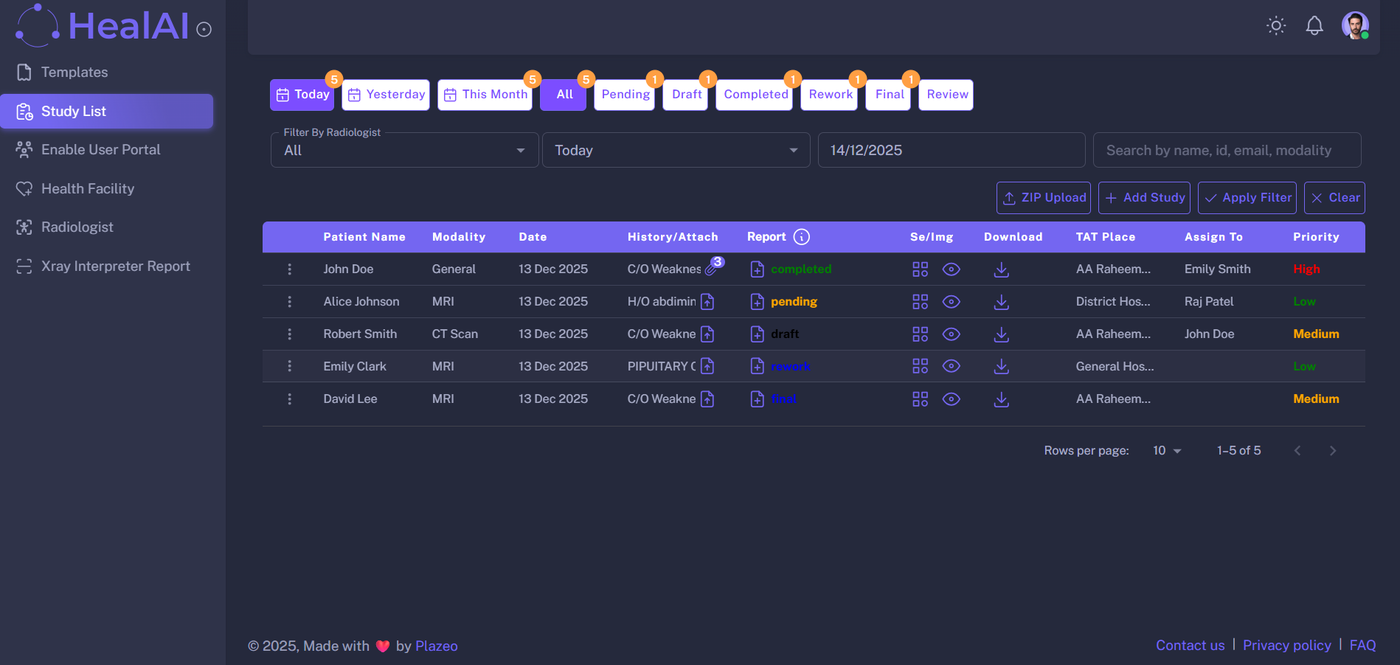
A worklist that shows what needs your attention
See studies assigned to you with their priority and reporting status. Open the viewer and report from the same study so you can move from one case to the next without searching across tools.
Follow the study through to sign-off
Review the images, dictate your findings, and use the template for the exam. Edit the draft before signing, and send it to human quality review when required.
- Open the study
- Review and dictate
- Edit, sign, and deliver
Read for the facilities you’re authorized to serve
Remote radiologists can work in a browser. Facility assignments and access permissions determine which studies appear in their worklist.
In practice
See the reporting queue from both sides
A hospital assigns a study, and the radiologist and facility team follow the work through delivery.
Facility assigns the study
The responsible reader sees the case in the worklist alongside the other studies assigned to them.
Reader works through the report
The viewer, dictation, and draft are opened from the study. The reader can edit before sending it for review or signing.
Facility follows delivery
Check whether the report is still in progress, signed, or delivered before following up.
Questions to bring to a demo
What does the demo show?
Ask to see an assignment, the reader’s worklist, a draft undergoing review, and the completed report at the receiving end.
Can a reader work for several facilities?
Yes, when their assignments and access permissions allow it. Ask to see the difference between two facility roles.
Tell us how your team works
Share where studies come from, who reads them, and how reports reach the care team. We’ll use that context for your demo.
help@healai.care